Understanding the gap analysis tool in the VSME module
Last updated: April 2, 2025
Compliance readiness is a key challenge for companies, and the gap analysis tool in the VSME module helps you assess whether you possess all the necessary data for reporting. This structured approach ensures that all necessary compliance information is in place, making it easier to identify missing, incomplete, or non-applicable data points.
What is a gap analysis?
A gap analysis is a method used to compare the current state of compliance data against regulatory requirements. By systematically identifying missing or incomplete information, companies can take targeted actions to close gaps and improve compliance readiness.
Why use the gap analysis?
The gap analysis tool offers several benefits to enhance compliance efficiency:
Systematic compliance assessment – Helps you identify missing data early.
Clear responsibility tracking – Ensures accountability for data collection.
Efficient reporting preparation – Reduces last-minute compliance issues and streamlines reporting processes.
How to use Coolset's VSME gap analysis tool
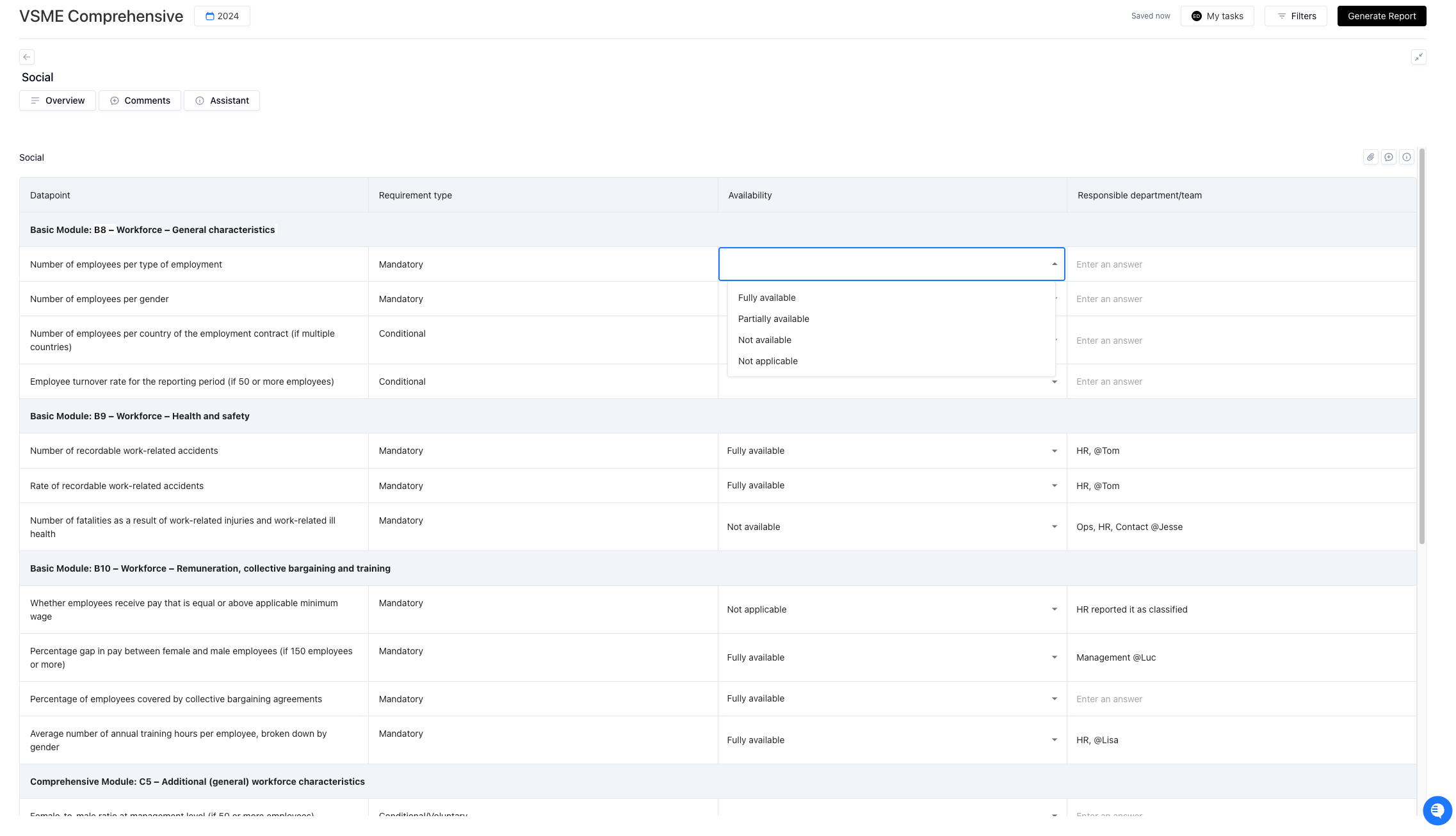
Our tool provides a list of all the required data points of VSME Basic and Comprehensive, allowing users to assess their availability by selecting one of the following options:
Available – The company has complete information for this data point.
Partially available – Some details exist, but full information is not yet accessible.
Not available – The company currently lacks this data.
Not applicable – The company is not required to report on this data point, or the information is classified.
In the table, you can also identify if each datapoint is mandatory, voluntary, or conditional. Conditional datapoints mean that you need to report on this only if certain criteria apply to you. We note it in the gap analysis tool, but you do not need to worry much about this as in the during the reporting we ask you all the conditions so that we show you only what is applicable to you.
You can also make notes on which people, teams, or departments you need to contact in order to get this information.
Differences between Basic and Comprehensive module
Companies can choose between the Basic and Comprehensive modules depending on their reporting needs. However, our gap analysis provided in both modules includes all datapoints from both standards. We do this so that in case you are interested in expanding from Basic to Comprehensive, you can already get an idea of what data you need to collect and understand how easy it would be for you to extend your reporting to the Comprehensive module.
Tips and mistakes to avoid
Use our task management tool for collaboration – Ensure accurate input by working with different teams that have the data you are looking for. You can use our task management functionality to do this by assigning or commenting on the team field in each datapoint.
Use notes strategically – Track responsibility and sources of information so that you already know where to find what.
Do not mark required data as non-applicable – Always verify regulatory obligations before selecting this option.
Unclear assignment of responsibilities – Ensure that designated teams understand and follow up on their data responsibilities.
Gather all datapoints marked as partially available or not available – Prioritize these missing data points and start actively seeking them to ensure comprehensive and accurate reporting.