How to complete the PPWR packaging questionnaire
Last updated: September 7, 2026
This guide is intended for suppliers who have received a data request from a customer using Coolset for PPWR compliance.
It also applies to operators who choose to complete the questionnaire themselves on behalf of a supplier, for example, when you already have the technical documentation and do not need to wait for the supplier to respond.
The packaging questionnaire is where all PPWR compliance data for a packaging item is collected: material composition, substances of concern, recyclability evidence, and supporting technical documentation. Completing it triggers the conformity assessment and, once passing, enables the Declaration of Conformity (DoC) to be signed.
Steps
1. Open the packaging questionnaire
Go to PPWR > Packaging items and select the packaging item you want to complete the questionnaire for.
Click Complete questionnaire.

2. Fill in basic information
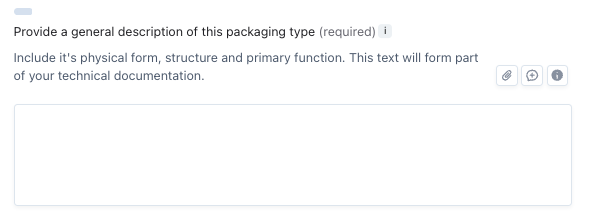
Answer all questions in this section. You need to provide general information of the packaging, like a description and its intended use.
The most important question here is whether the packaging has food contact. This determines whether PFAS obligations apply. If the packaging comes into direct contact with food, the PFAS section will appear in substances of concern. If it does not, PFAS is not required.
Next to each question, you see three icons:
paperclip: let's you add a document
chat box: let's you add a comment and tag team members
info box: shows supporting information that can help answering the question
To move to the next section, click on the back-arrow in the top-left corner
4. Fill in materials, design, and diagrams
This section covers the physical composition of the packaging item.
For each component (e.g. bottle, label, cap, sleeve), provide:
The material type (resin or substrate)
The weight of the component
Once you have entered all components, the platform calculates the total weight and material breakdown automatically.
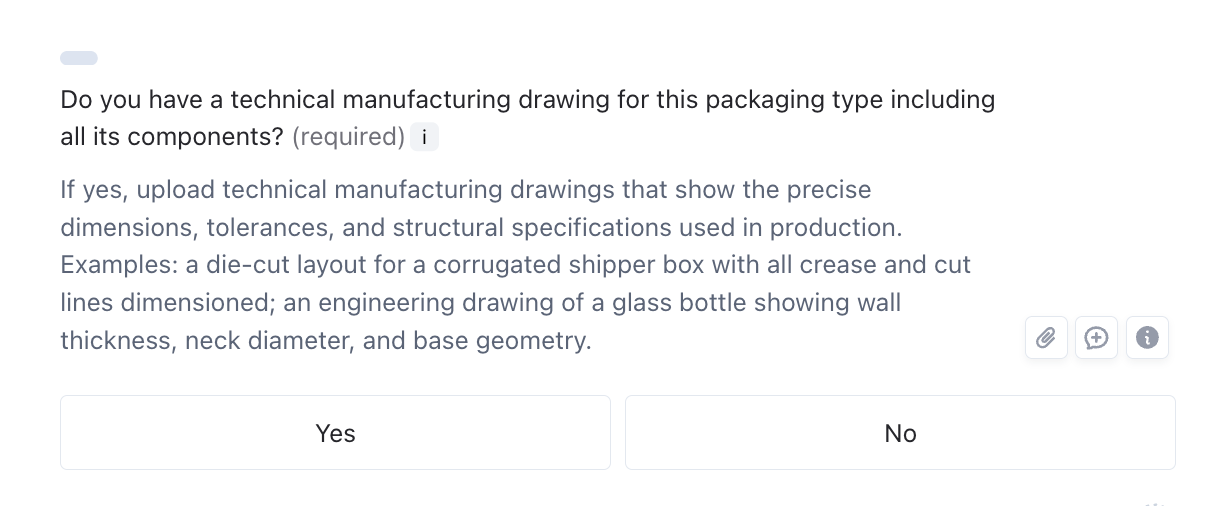
This section also requires design documents and technical drawings — diagrams showing how the packaging is constructed. Upload these as evidence. Missing design documents is one of the most common causes of a failing Document completeness control in the assessment. If you answer "yes" to having conceptual design diagrams, attach the file using the paperclip icon next to the question.
In the grey text underneath a question, you'll will see if a question requires a document:
5. Fill in substances of concern
This section covers two areas:
Heavy metals — required for all packaging categories. This section shows an overview of the heavy metal concentrations across your packaging components, calculated from the values entered in the materials section. Check whether your components are below or above the 100 mg/kg threshold. If any components exceed the threshold or if you want to substantiate your declaration, upload a test report or supplier declaration here.
PFAS — required only for food-contact packaging. If this section appears, it means the packaging was identified as food-contact in the basic information step. The questionnaire walks you through the staged PFAS testing process:
Step 1: Total fluorine (threshold: 50 mg/kg)
Step 2: If Step 1 exceeds the threshold — inorganic and organic fluorine
Step 3: If Step 2 still exceeds the threshold — total oxidizable precursors (TOP) test
You do not need to know the full testing process in advance. The questionnaire guides you through each step based on your answers.
6. Fill in recyclability
Upload evidence that the packaging is designed for recycling. The current applicable standard is EN 13430 (from the Packaging and Packaging Waste Directive). This standard assesses whether packaging is designed to be recyclable — including whether it can be separated into recyclable streams and whether recycling infrastructure exists in the markets where it is sold.
Upload proof of compliance with EN 13430.
Note: from 2030, recyclability will be assessed using a new PPWR grading system (grades A through D, with a minimum of grade C required). The platform will be updated once that grading system is finalized.
7. Fill in harmonisation standards
This section covers any harmonised European standards or common specifications that apply to the packaging item. Upload relevant documentation or declarations where applicable.
8. Run the assessment
Once you have completed the sections relevant to your packaging item, close the questionnaire using the cross in the right top corner and click Re-run assessment on the packaging item overview screen.
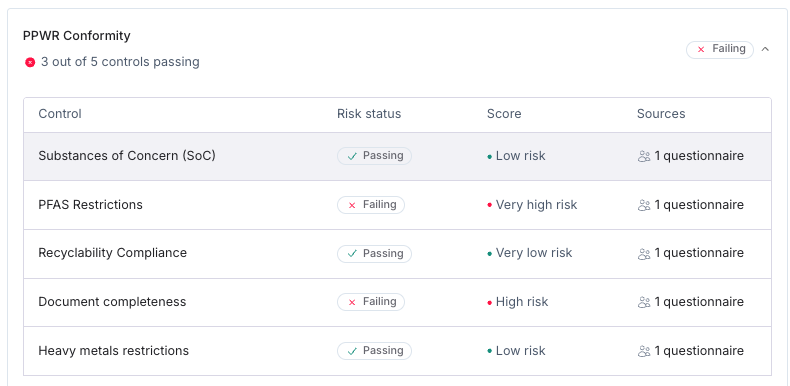
Coolset runs all applicable PPWR checks against your responses:
Substances of concern (SoC) — declaration of measures taken to minimise SoCs in your processes
PFAS restrictions — PFAS within threshold (food-contact packaging only) and the availability of test reports
EN 13430 compliance — recyclability evidence present
Document completeness — all required documents uploaded
Heavy metals restrictions — component-level heavy metal check and the availability of test reports
Each control shows a status (Passing or Failing) and a risk level. If a control is failing, click on it to see which specific KPI is at issue and which question in the questionnaire you need to revisit.
You can run the assessment at any point, you do not need to complete all sections before running it. Sections that have not been filled in will remain Pending.
10. Resolve failing controls
If a control is failing, open the questionnaire again and go to the relevant section. The most common causes are:
Document completeness — very high risk: a required document (most often design diagrams or technical drawings) has not been uploaded. Go to Materials, design, and diagrams, confirm you have answered "yes" to having the relevant documents, and attach the file.
Substances of concern — failing: a heavy metal or PFAS value exceeds the applicable threshold, or a required declaration is missing.
EN 13430 compliance — failing: a recyclability test report has not been uploaded, or the packaging does not meet the standard's requirements.
After updating the questionnaire, click Re-run assessment again to check whether the control now passes.
For more information on resolving failing controls, check out this article:
📄 How to resolve failing risks in your PPWR conformity scores
Documents and the data library
Any document you upload is automatically saved to the data library. If the same document applies to multiple packaging items or multiple questions, you do not need to re-upload it each time. Select it from the data library when prompted.
Documents must be manually linked to each question they cover. There is no automatic assignment based on document content.
Frequently asked questions
Do I need to complete all sections before running the assessment? No. You can complete the sections you have data for, run the assessment, and see which controls pass or fail. Sections not yet filled in remain Pending.
The food contact section did not appear for me. Why? If you indicated in the basic information step that the packaging does not have food contact, the PFAS section is not shown. PFAS obligations under PPWR apply only to food-contact packaging.
I don't have the heavy metal test results. What should I do? Contact your material supplier — in most cases, heavy metal concentrations for standard packaging materials are available from the manufacturer of the raw material. For packaging that is clearly unlikely to contain heavy metals (e.g. plain paper), the guidance acknowledges some leniency, but a declaration is still best practice. One exception: recycled glass has an elevated heavy metal threshold and is treated separately.
Do I need to complete the questionnaire for each packaging item separately? Yes. The questionnaire is completed per packaging item. If the same document applies to multiple packaging items, upload it once and reference it from the data library for each.
What happens after the assessment passes? Once all controls are passing, the Annex VII technical file is compiled automatically. Your customer can then review the technical documentation and proceed to sign the Declaration of Conformity. If you are identified as the manufacturer, the Sign DoC button will be available to you directly.
Can multiple people work on the questionnaire? Yes. You can assign specific sections to colleagues within your workspace and leave comments for internal collaboration.