How to sign a Declaration of Conformity (DoC) in Coolset
Last updated: September 7, 2026
A Declaration of Conformity (DoC) is the legally binding document that confirms a packaging item meets all PPWR obligations. You sign it in Coolset after the conformity assessment is completed for a packaging item. There is only one manufacturer per packaging item, the manufacturer needs to sign the DoC. The manufacturer is the party whose trademark appears on the packaging, or who designed it.
Before you sign
You can only sign a DoC if the conformity assessment is passing. This means that the following is in place:
The packaging item has been added in Coolset
The packaging questionnaire (substances of concern, recyclability, minimization) is passing
Test reports have been uploaded where required
You have reviewed the evidence bundle and confirmed the technical documentation is complete
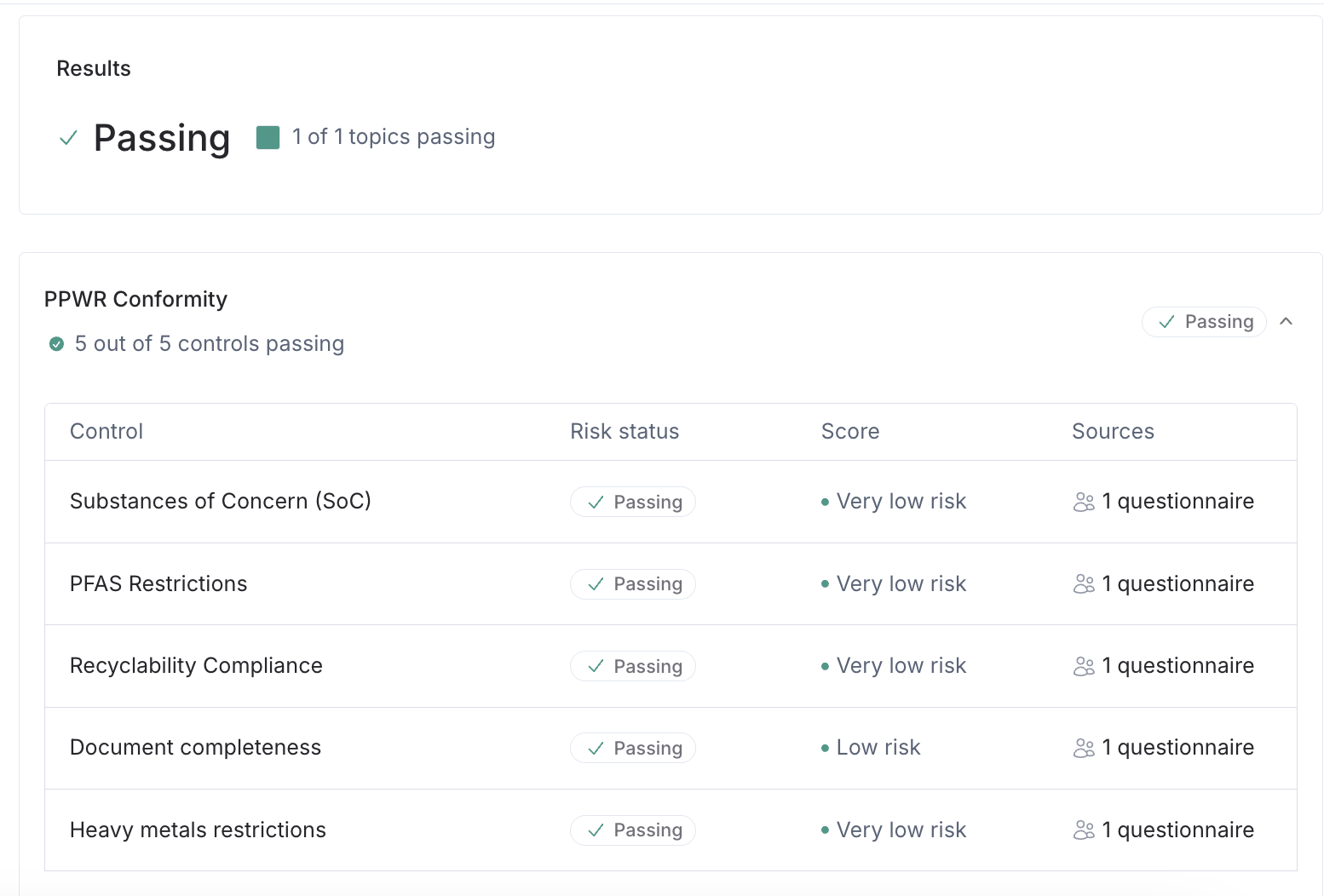
Do not sign until you have reviewed the evidence bundle. The DoC is a legal declaration, signing it means you confirm all underlying documentation is accurate and complete.
How to sign a DoC
Go to PPWR in the left navigation menu and click "View all" under products
Select the product that contains the packaging item you want to declare
Click the Create DoC button
Select one or more packaging items for which you want to create DoC
Click "complete questionnaire" in the side panel that opens
Review the pre-filled declaration fields: name, address, regulatory reference (Regulation (EU) 2025/40), and technical file reference
Fill in any empty fields (some field require the context from the manufacturer)
Click the "cross" in the right top corner to close the questionnaire and click "update assessment results"
Once the assessment is passing, you unlock the "Sign DoC" button
Click "Sign DoC" to issue the DoC
Coolset generates the DoC as a PDF and stores it automatically against the packaging item.
You can access the DoCs under the DoC tab of your product or packaging items or directly from PPWR dashboard -> Declarations.
Bundling multiple packaging items in one DoC
You can include multiple packaging items in a single DoC, but only if all of the following apply:
They share the same materials and design
They are intended for the same packaged product
Differences between them (e.g. size variants) do not affect conformity with any requirement under Articles 5–12
If any of these conditions are not met, each packaging item requires its own DoC. When in doubt, issue separate DoCs.
📄 When can two packaging units share the same Declaration of Conformity
What Coolset includes in the DoC
The generated DoC contains all 9 mandatory fields required under Annex VIII of Regulation (EU) 2025/40:
Unique identification number
Manufacturer name and address
Statement of sole responsibility
Description and traceability identifier of the packaging item
Conformity statement referencing Regulation (EU) 2025/40
Harmonized standards applied (e.g. EN 13430:2004)
Notified body reference (under Module A self-assessment, this field is left blank)
Technical file version reference
Signature, place, and date
After signing
The signed DoC is stored in Coolset under the DoC tab of the relevant product. You can download it at any time for audit purposes.
Retention requirements:
Single-use packaging: retain for 5 years from the date the last unit was placed on the EU market
Reusable packaging: retain for 10 years from the same date
If a market surveillance authority requests your documentation, you are required to produce it within 10 days. Coolset retains both the signed DoC and the bound technical file centrally.
When you need to re-issue a DoC
A signed DoC becomes invalid if any of the following change:
Composition — material, weight, or dimensions of the packaging
Supply — a new supplier provides the same packaging (reassessment required even if the DoC is not automatically invalidated)
Product — a different product is placed in the same packaging
Standards — new harmonized standards or common specifications are published that apply to your packaging item
When any of these occur, update the assessment in Coolset and sign a new DoC.
Frequently asked questions
Can I sign a DoC if the questionnaire is incomplete?
No. All required fields in the packaging questionnaire must be completed and test reports uploaded before the Sign DoC option becomes available.Who needs to sign the DoC, me or my supplier?
The manufacturer under PPWR signs the DoC. If your trademark appears on the packaging or you designed it, that is you. If you are the importer of packaging made by a non-EU manufacturer, the non-EU manufacturer signs, but you are responsible for verifying that the documentation exists and can be produced within 10 days.Can one DoC cover multiple SKUs?
Only if those SKUs share the same materials, design, and packaged product, and reach the same compliance outcome across all PPWR requirements. Different box sizes that contain different products require separate DoCs.What happens if I signed a DoC but the packaging changes?
The existing DoC is no longer valid for the changed packaging. Run the assessments again in Coolset and sign a new DoC before placing the updated packaging on the EU market.Where do I find a DoC I already signed?
Go to PPWR, select the product, and open the DoC tab. From there you can download the signed PDF and the evidence bundle.I split my packaging into separate entries per supplier. Do I need a DoC per component? No. If the entries together form one physical packaging unit (e.g. bottle body, lid, and label from three suppliers), they count as one packaging item and receive one DoC covering the assembled unit. Select all component entries when signing the DoC.