How to add origins?
Last updated: September 17, 2026
Under the EUDR, an origin is a plot of land where a commodity was produced. Each batch must be linked to an origin to demonstrate that production is deforestation-free and legally compliant (Articles 3 & 9, EUDR).
In Coolset, origins are reusable entities — once created, you can link a single origin to multiple products, lots, and sales orders. Origin data must be provided by the producers of a product.
Getting started
Go to the Catalog tab and select Origins.
Origins can be added manually or imported in bulk. If you want to include coordinate data, use the bulk import.
Note: The Origins tab only appears after you add a produced product to your product catalogue. See: 📄 How to add products?
Adding origins manually
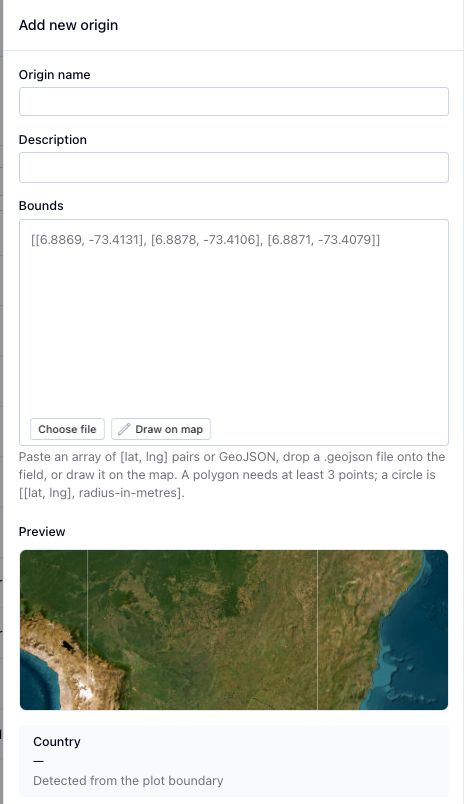
Click "+ Add" to open the origin creation side panel
Fill in the origin name and description.
You can paste the coordinates of the bounds of the plot. at least 3 coordinate points required.
You can draw the plot boundaries using one of the available tools:
Polygon — free-draw the plot boundary.
Circle — draw a circular plot (for plots under 4 hectares).
Or you can upload a GeoJSON file
The country is automatically selected based on where your plot is located.
Click "Add origin" to save the origin and start the risk assessment.
What an origin record contains
Geolocation shape (drawn polygon or GeoJSON upload)
Basic plot data (area, commodity, country, production date)
Linked producer details and risk score
For instructions on bulk importing your origins check out:
📄 Import guide for CSV uploads
Chinese suppliers: converting coordinates with the Plot locator
Chinese suppliers often have plot documents (such as a 林权证 / Forest Tenure Certificate) that use a Chinese coordinate system. These coordinates are not the same as WGS84 or Gauss-Krüger, which Coolset and most of the rest of the world use. Due to Chinese data security regulations, there is no reliable 1:1 conversion between the two systems.
To help with this, use the Plot Locator: coordinates.coolset.com
What it does:
Upload the document containing the Chinese coordinates. The tool extracts them and shows their approximate location on a map.
Using that approximate location as a reference, manually trace the exact plot boundary on the map.
Use the coordinates generated by your traced plot to fill in the origin in Coolset.
Important: This tool does not automatically convert Chinese coordinates into usable geolocation data. It gives you a starting point so you can manually and accurately plot the origin yourself. You still need to trace the plot boundary by hand.
→ Once you have your coordinates, continue with "Adding origins manually" above.
Geolocation requirements:
Single point: allowed for plots under 4 hectares. Ensure six decimal places are provided. For cattle establishments, always use points regardless of plot size.
Polygon: required when a plot exceeds 4 hectares. Describes the perimeter of the plot.
Accuracy requirements
A polygon must cover one single plot of land. Do not use a single polygon to trace several plots with excess land included.
If there are multiple harvests from the same plot, record one plot with multiple harvest dates.
There is no maximum plot size, but the polygon must capture the precise area under homogeneous conditions.
FAQ
The country field won't let me select a value / there is no dropdown? The country is automatically populated when you select a location on the map. Draw a polygon or place a marker first — the country will fill in automatically.
My CSV import is taking a long time or not responding? Check that your coordinates are in valid GeoJSON format and that the country_code uses the 2-letter ISO standard. If the import takes more than a few minutes, try reducing the number of rows and importing in batches. Contact support via the in-app chat if the issue persists.
Can I reuse origins across multiple orders or customers? Yes. Origins in Coolset are reusable entities. Once created, you can link one origin to multiple products, lots, and sales orders.