How to share your location in a module?
Last updated: November 12, 2025
When asking a colleague or a Coolset employee for help, it’s often useful to direct them to the exact part of the module you're working on. You can do this by copying and sharing your location using the in-app link feature.
🧭 Steps to Copy Your Location Link
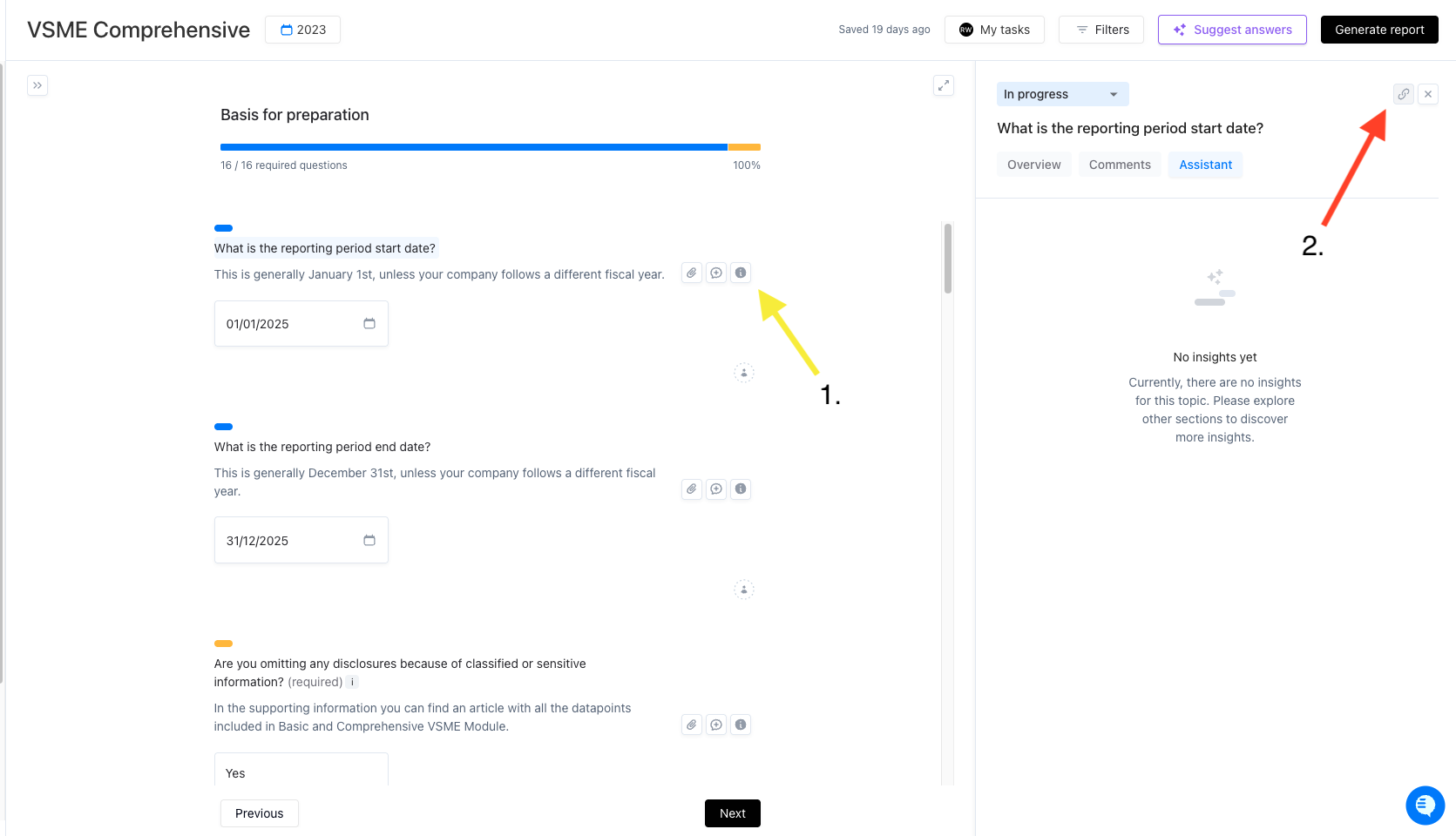
Click the ℹ info icon
Next to any question in the module, you’ll see a small "i" icon. Click it to open a side panel with more details.Find the link icon in the side panel
In the top-right corner of the side panel, click the 🔗 link icon.Copy the link
Clicking the icon will automatically copy a direct link to your current location.Share the link
Paste the link into a message to:A colleague, to collaborate on a specific part of the module.
A Coolset team member, to request support on a particular question.
💡 Why Use This?
Quick collaboration: Point others exactly where you need help.
Faster support: Give the Coolset team immediate context.
No confusion: Avoid unclear references like "that one emissions question."
🖼 Example Screenshot
✅ Tip
Make sure the person you're sharing the link with has access to the same module, otherwise the link won’t work for them.